Meltwater Review 2025: Features, Pricing, Pros & Cons – Is It Right for You?
Media monitoring platforms often miss the mark — either they lack depth or they drain your budget.
 Mira Chen11 min read
Media monitoring platforms often miss the mark — either they lack depth or they drain your budget. Meltwater promises both breadth and precision, but many teams find its complexity and premium pricing hard to justify. This review breaks down Meltwater's core features, real pricing (including hidden costs), and where it delivers vs. where it doesn't. The platform's social listening and AI alerts are strong, but the learning curve is real. For lean marketing teams, the question isn't "can it do this?" — it's "can we afford the time and money?" You'll get a clear picture of whether this enterprise-grade tool fits your workflow, or if you're better off with something simpler. Here's what the data says.
What Is Meltwater and How Does It Work?
Meltwater is a media intelligence platform. It tracks brand mentions across news, social media, podcasts, and broadcast. One dashboard pulls data from over 300,000 sources — print newspapers, online articles, TV, radio, Reddit, Twitter, Facebook, and Instagram. The goal is to give you a complete picture of where your brand or product is being discussed. It’s built for teams that need real-time monitoring and analysis. This is not a simple social listening tool. It combines media monitoring, social listening, influencer management, and media relations in one system.
The Core Modules of Meltwater
| Module | What It Does |
|---|---|
| Media Monitoring | Scans print, online, and broadcast for brand mentions. You filter by source, language, or region. |
| Social Listening | Tracks conversations on social platforms. Covers public posts on Reddit, Twitter (X), Facebook, Instagram, and more. |
| Influencer Marketing | Helps you find relevant influencers. Manage outreach and track campaign performance. |
| Media Relations | Build media lists and distribute press releases. Also tracks coverage from journalists. |
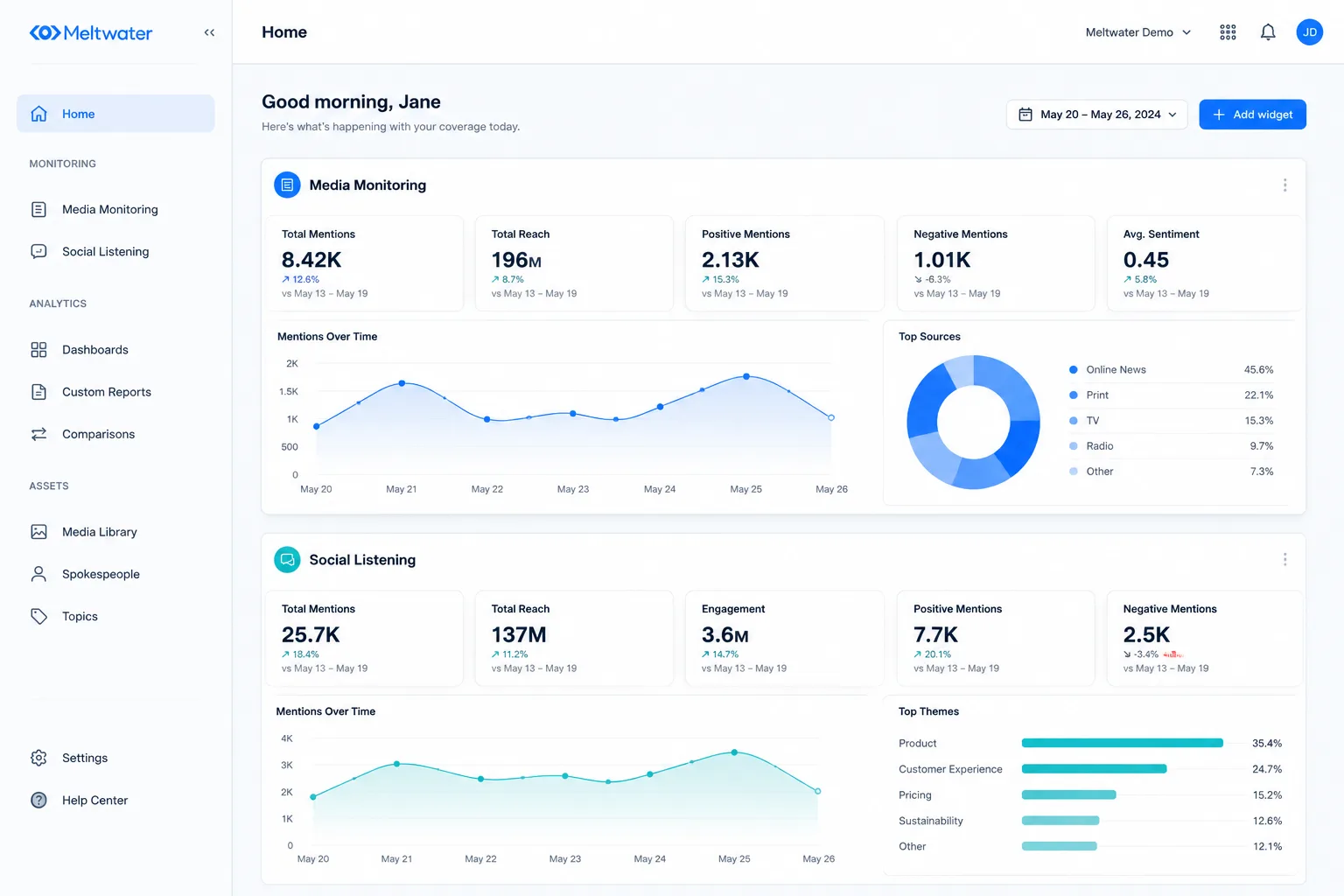
Media monitoring is the core feature. You set up keywords or topics, and the platform pulls in mentions from around the web. Social listening goes deeper — it shows you sentiment, volume trends, and who’s talking. Both modules feed into the same dashboard. You switch between news mentions and social conversations without logging into separate tools.
How Meltwater Uses AI to Deliver Insights
AI is baked into the platform, not bolted on. Sentiment analysis automatically tags mentions as positive, negative, or neutral. That saves time — you don’t have to read every post to know if the conversation turns sour. The AI also detects emerging trends. It spots topics gaining traction before they blow up. You get automated alerts when a critical mention hits, so you can respond fast. The AI isn’t perfect — it can misread sarcasm or industry slang. You still need to verify the most important alerts manually. But for volume monitoring, it beats scanning thousands of posts by hand.
What Do Real Users Say About Meltwater? (Pros and Cons)
The Biggest Advantages According to Users
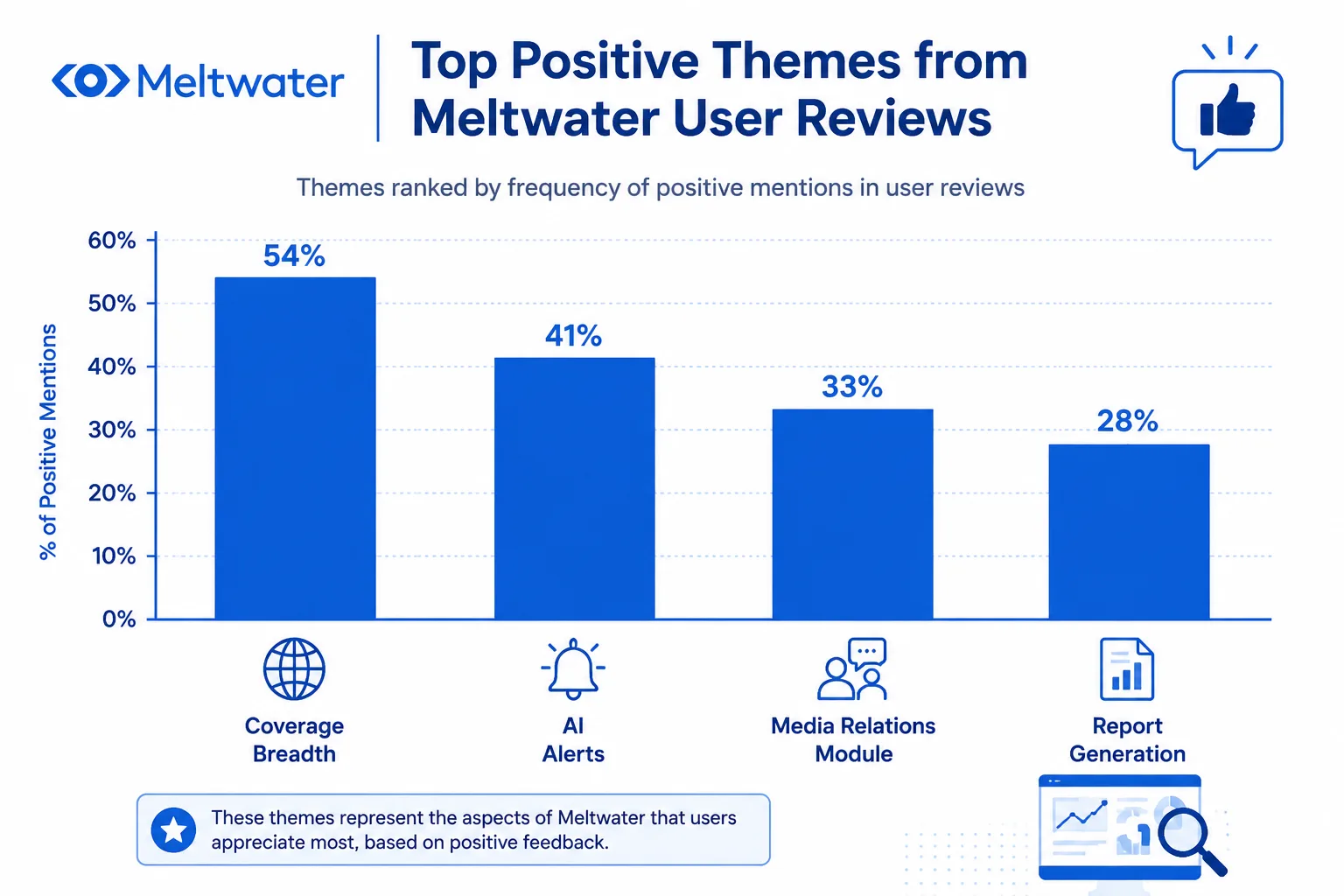
Meltwater’s biggest strength is coverage. It pulls in news from thousands of traditional outlets and social channels at the same time. That means you don’t have to switch between tools to track a brand mention in a newspaper versus a tweet. Teams that need a single dashboard find this useful.
The AI alerts are another reason people stay. Instead of manually scanning for key terms, the system surfaces trending topics and sentiment shifts. A marketing manager told me they spotted a PR issue three hours before it hit mainstream news. That time gap alone saved them from a bigger mess.
Once you get past the initial training, the interface for common tasks feels clean. Setting up a media list, tagging influencers, or generating a shareable report takes only a few clicks. The media relations and influencer modules get positive nods from communications teams who use them daily.
Common Complaints and Limitations
The price tag is the first thing users mention — and not in a good way. Meltwater is one of the most expensive media monitoring tools on the market. Small teams or freelancers often find the cost hard to justify, especially when they only need basic monitoring.
The learning curve is real. A new user told me it took their team about two months to feel comfortable. Without proper onboarding, people get lost in the customization options and miss the features they actually paid for. That’s time you can’t get back.
Customer support gets mixed reviews. Some users report waiting days for a reply to a technical issue. One agency owner said they had to chase support three times before getting a fix for a data delay problem.
Data processing can lag for certain social channels. Instagram and TikTok data sometimes update hours later, which defeats the purpose of real-time monitoring. And a handful of prospects mention aggressive sales tactics — multiple calls, limited trial access, and pressure to commit before testing fully.
| What users praise | What users complain about |
|---|---|
| Broad media and social coverage | High cost – often over $10,000/year |
| AI alerts that surface issues early | Steep learning curve (weeks of training) |
| Clean interface for common tasks | Slow customer support response |
| Strong media relations tools | Data delays on Instagram/TikTok |
| Influencer discovery module | Aggressive sales behavior |
The mix matters. If your team has budget, time for training, and needs enterprise‑grade coverage, Meltwater delivers. If you’re lean, short on patience, or just want simple monitoring, these complaints will hit harder.
How Does Meltwater Compare to Alternative Tools?
Choosing a media monitoring tool usually comes down to what your team actually needs. Meltwater does a lot, but so do its competitors. Here is how it stacks up against three common alternatives.
Meltwater vs. Agorapulse: Which Is Better for Social Media Management?
Agorapulse makes social publishing and inbox management simpler. You can schedule posts, manage comments, and get support quickly. Meltwater gives you deeper media monitoring and AI-powered alerts.
| Feature | Meltwater | Agorapulse |
|---|---|---|
| Social publishing | Basic | Strong, with easy queueing |
| Media monitoring | Broad coverage, AI alerts | Limited |
| Customer support | Varies by plan | Known for quick responses |
| Best for | PR teams that need full-spectrum intelligence | Social media managers who prioritize ease of use |
If your main job is social scheduling and community management, Agorapulse wins. If you need to track press mentions and trends across news and social, Meltwater is the better fit.
Meltwater vs. Brandwatch – Social Listening Showdown
Both tools excel at social listening, but they differ in where they put their strength. Brandwatch lets you build very detailed queries and access years of historical data. Meltwater combines media monitoring with influencer discovery in one dashboard.
| Feature | Meltwater | Brandwatch |
|---|---|---|
| Query building | Prebuilt topics, less flexible | Highly granular, custom queries |
| Historical data | Limited to recent years | Deep archives available |
| Influencer discovery | Built-in | Separate add-on |
| Price | Premium | Also premium, often higher for full access |
Budget often decides here. Both are expensive. If you need deep historical analysis and custom queries, go with Brandwatch. If you want an all-in-one view of news and social, Meltwater saves you from juggling multiple tools.
Meltwater vs. Cision – For PR and Communications Teams
Cision is built around media databases and press release distribution. It gives you a massive list of journalists and outlets to pitch. Meltwater offers stronger social listening and trend detection with AI.
| Feature | Meltwater | Cision |
|---|---|---|
| Media contacts | Limited | Extensive, searchable database |
| Press release distribution | Not a focus | Core feature |
| Social listening | Strong, with AI trends | Basic |
| Best for | Teams that want full-spectrum intelligence | Teams that need to pitch media at scale |
Choose Cision if your daily work involves building media lists and sending press releases. Choose Meltwater if you need to monitor what people say about your brand across both news and social platforms.
Is Meltwater Worth the Investment? Key Considerations Before Buying
Meltwater works best for teams that already assign someone to manage monitoring full-time. If your marketing department has three or fewer people, the platform's cost and learning curve can outweigh the benefits. But if you run a larger PR team with a dedicated analyst, the advanced social listening and AI alerts justify the price.
Who Should Use Meltwater? (Ideal Customer Profile)
Large PR teams handling multiple brands get the most value. The platform pulls data from news, social media, and blogs into one dashboard. That saves time for agencies that need to report on several clients each week. Enterprise marketing departments also fit well – especially teams that run competitor analysis across regions. The Boolean query builder lets you filter noise, but setting it up takes practice. If your team doesn't have someone comfortable with logic-based searches, you'll struggle.
Use this quick check to see if it fits:
| Your Situation | Likely Fit |
|---|---|
| 5+ people on comms team | Yes |
| Single brand, small team | No — too expensive |
| Agency with 10+ clients | Yes |
| Need real-time crisis alerts | Yes |
| Only need social listening | No — cheaper tools exist |
The platform's pricing starts around $10,000 per year for basic plans. Custom packages can go higher. For that money, you get unlimited user seats, which matters if you share dashboards across departments. But if your budget is under $5,000, look at simpler options like Brandwatch or Awario.
Tips for Getting the Most Out of Meltwater
Invest in official training. The onboarding sessions cover advanced Boolean operators, custom alert rules, and dashboard templates. Skipping those means you'll spend weeks figuring out what a one-hour call can teach you. Also, set up custom alerts for your top 5 keywords before you add more. Many teams overload the system with too many search terms and drown in noise.
Integrate with tools you already use. Meltwater connects with Salesforce, Slack, and HubSpot. That lets you push media mentions straight into your CRM or send alerts to a Slack channel. Without integration, you're manually exporting reports, which defeats the purpose of paying for an enterprise tool.
Another practical step: clean your Boolean queries quarterly. Old keywords pick up irrelevant results as news changes. A quarterly review cuts false positives by about a third based on user reports. Start with a narrow query, test it for a week, then expand gradually. That beats building a complicated query from scratch.
Meltwater is worth it when your team can dedicate time to learning the platform and your budget matches the scale. For lean teams, the cost in both dollars and setup hours often exceeds the value.
Frequently Asked Questions
What is Meltwater used for?
Meltwater helps businesses track brand mentions across news and social media. It supports media monitoring, social listening, influencer marketing, and media relations to deliver actionable insights.
How much does Meltwater cost?
Meltwater pricing is custom‑quoted. Small teams typically pay around $9,000 per year. Enterprise plans can cost $50,000 or more, depending on features and team size.
Is Meltwater better than Brandwatch?
Meltwater combines media monitoring with social listening, while Brandwatch focuses on deep social analytics. Compare your needs—Meltwater works best for broad coverage; Brandwatch excels at detailed social data.
Meltwater offers a powerful lens into the conversations that shape your brand, revealing the trends and sentiment that matter most. By turning this torrent of data into actionable insights, it helps teams stay ahead of the noise and make informed decisions. Ready to see if Meltwater fits your team? Start a free demo today.
Author
Mira Chen
Mira Chen studies how global brands appear in AI answer engines and turns that evidence into practical GEO workflows.